The terms get thrown around interchangeably: AI analytics, business intelligence, BI tools, data analytics. But if you’re trying to choose a tool for your business, there’s a real, meaningful difference between AI-powered analytics and traditional BI — and it’s not just marketing hype.
Here’s the clearest way to understand it: Traditional BI tools show you what happened. AI analytics tells you what’s happening, why it matters, and what to do about it.
The Core Difference: Reactive vs. Proactive
Traditional business intelligence (think Tableau, classic Power BI, Looker) is fundamentally reactive. You ask a question, the tool shows you a chart. You build a dashboard, the tool updates the numbers. You are the analyst — the tool is just a sophisticated visualization engine.
AI analytics (like Pulse AI, ThoughtSpot Sage, Power BI with Copilot) is proactive. The AI continuously monitors your data, identifies patterns, detects anomalies, and surfaces insights you didn’t know to look for. You wake up to a briefing of what’s changed in your business overnight. The AI is the analyst — you’re the decision-maker.
Feature-by-Feature Comparison
Data Querying
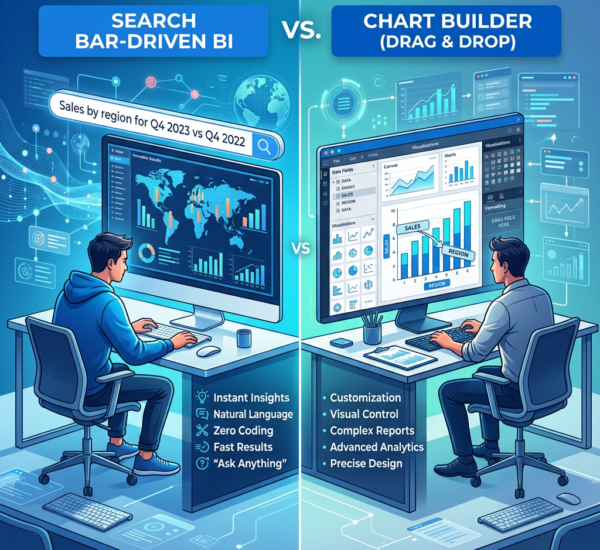
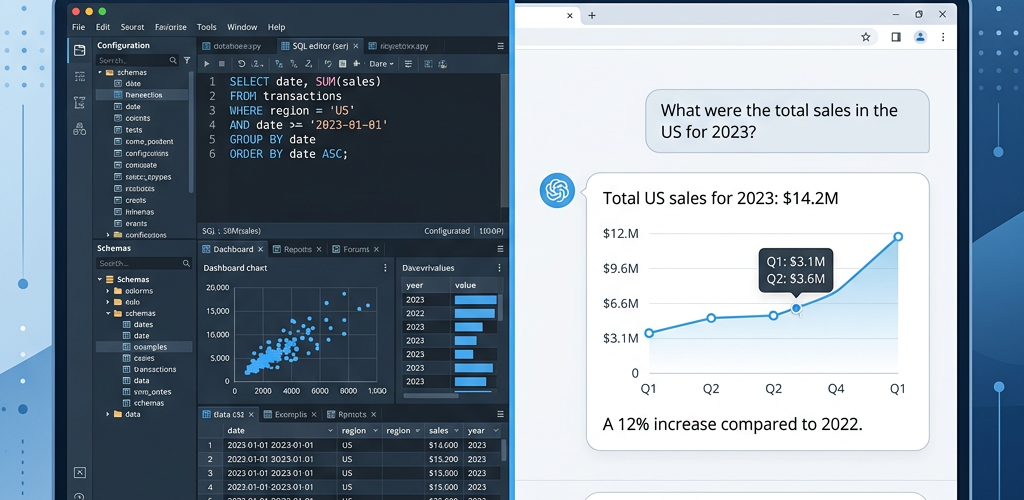
Traditional BI: You write SQL queries or use a visual query builder to specify exactly which data you want and how to aggregate it. Requires understanding of database concepts (tables, joins, filters) even if you’re not writing raw SQL.
AI Analytics: You type questions in plain English: “What were sales by region last quarter?” The AI translates your question into the appropriate query, runs it, and returns an answer with visualizations. No technical knowledge required.
Winner: AI analytics, decisively — for non-technical users. Traditional BI still wins for complex, highly specific queries where you need exact control.
Dashboard Creation
Traditional BI: You manually build dashboards by dragging fields onto a canvas, choosing chart types, configuring filters, and arranging layouts. This takes hours to days depending on complexity. Requires design thinking: what metrics matter, how to visualize them, what comparisons to show.
AI Analytics: You describe what you want to track or say “create a sales performance dashboard.” The AI generates a dashboard automatically based on your data and common business metrics. You can customize from there if needed, but you get 80% of value in seconds instead of hours.
Winner: AI analytics for speed and accessibility. Traditional BI for pixel-perfect custom dashboards.
Insight Discovery
Traditional BI: You look at dashboards and try to spot patterns. If you don’t know what question to ask, you won’t find the answer. Discovery is limited by what you think to look for.
AI Analytics: The AI proactively analyzes your data and surfaces insights: “Revenue from email marketing dropped 34% this week.” “Product X is trending — sales up 156% with no additional marketing.” You discover things you didn’t know to look for.
Winner: AI analytics — this is where the ROI multiplies. Traditional BI can’t do this at all.
Data Preparation
Traditional BI: You often need to clean, transform, and prepare data before it’s analysis-ready. This is called ETL (Extract, Transform, Load) and typically requires data engineering skills. Even self-service BI tools assume relatively clean, well-structured data.
AI Analytics: Modern AI analytics platforms handle more data messiness automatically — detecting data types, handling inconsistent formatting, suggesting joins between tables. Still requires decent data quality, but more forgiving than traditional BI.
Winner: AI analytics, but both still benefit from good data hygiene.
Predictive Analytics
Traditional BI: Shows historical data and trends. Any forecasting requires you to manually configure statistical models or use separate tools. Most traditional BI users just look at trailing indicators.
AI Analytics: Built-in forecasting and predictive insights. “Based on current trends, you’ll hit $X revenue next quarter.” “Customer Y shows churn risk based on behavior patterns.” The AI handles the predictive modeling automatically.
Winner: AI analytics — traditional BI wasn’t built for this.
Cost and Setup Time
Traditional BI: Tableau and classic BI tools often require weeks to set up properly, with data engineers or consultants building the initial infrastructure. Ongoing maintenance is significant. Costs vary widely: $15/user/month for basic Power BI to $100K+ for enterprise Tableau implementations.
AI Analytics: Modern AI analytics for small businesses (Pulse AI, etc.) is designed for 10-minute setup with no technical help. Pre-built integrations handle data connections automatically. Pricing typically $50-$500/month for small business plans.
Winner: AI analytics for small businesses. Traditional BI can be cheaper for very large teams if you already have the infrastructure.
Evolution, Not Replacement
It’s important to understand that AI analytics isn’t a completely different category — it’s the evolution of business intelligence. Think of it like: Traditional BI = calculator. AI Analytics = financial advisor.
Both work with the same underlying data. Both create visualizations. But the level of intelligence, autonomy, and proactive insight is fundamentally different.
In fact, many traditional BI tools are adding AI features: Power BI added Copilot, Tableau added Einstein AI, Looker integrated Gemini. The market is converging toward AI-native experiences, but tools built as AI-first (like Pulse AI and ThoughtSpot) tend to have more mature AI capabilities than AI features bolted onto traditional platforms.
Which One Do You Need?
Here’s the practical decision framework:
Choose AI analytics if: Your team is non-technical and you need self-service data access. You want the tool to proactively find insights, not just display charts. Speed matters — you need answers in seconds, not hours. You’re a small-to-mid-size business without a dedicated data team. You want minimal setup and maintenance.
Choose traditional BI if: You have a dedicated BI/analytics team with technical skills. You need pixel-perfect control over every dashboard detail. You have complex, highly custom analytics requirements. You’re deeply embedded in a specific ecosystem (Microsoft, Google, Salesforce) and want native integration. You already have BI infrastructure and just need to maintain it.
Choose hybrid if: You’re a larger company that needs both self-service AI analytics for business users AND custom BI capabilities for analysts. Many companies in the 50-500 employee range run both: AI analytics for operational users, traditional BI for the analytics team.
The Future: Agentic AI Analytics
The cutting edge of AI analytics is moving beyond just answering questions to becoming agentic — AI that takes actions on your behalf. Examples: AI that automatically pauses underperforming ad campaigns when ROI drops below target. AI that reorders inventory when stock patterns predict stockouts. AI that sends personalized retention offers to customers showing churn signals.
This is where tools like Pulse AI are headed: not just telling you what’s wrong, but fixing it automatically with your approval. Traditional BI can’t do this — it wasn’t designed for autonomy.
Frequently Asked Questions
Can I use Excel instead of either BI or AI analytics?
Excel works for very small businesses or simple use cases. But Excel can’t: (1) connect to live data sources automatically, (2) proactively find insights, (3) scale to team-wide data access, or (4) handle predictive analytics well. Most businesses outgrow Excel by $500K-$1M in revenue.
Do traditional BI tools with added AI features work as well as AI-first tools?
It depends on the vendor and how deeply they integrated AI. Power BI with Copilot is quite good. Tableau’s AI features are more limited. AI-first tools like Pulse AI and ThoughtSpot tend to have more mature AI capabilities because the entire UX was designed around AI interaction from day one, not retrofitted.
Is AI analytics just a trend, or is this the future of BI?
Gartner predicts that by 2027, natural language will be the primary interface for 50% of BI interactions (up from 10% in 2023). Every major BI vendor is investing heavily in AI features. This isn’t a trend — it’s the evolution of the entire category. Traditional query-based BI is becoming the legacy approach.