Last updated: March 2026 | Reading time: 11 minutes
When you run a small business, data is everywhere: sales in your CRM, expenses in QuickBooks, marketing performance in Google Analytics, inventory in your e-commerce platform. But it’s scattered across tools, and getting a complete picture means manually exporting, combining, and analyzing data in spreadsheets.
Most business intelligence tools were built for enterprises with data teams. They assume you have analysts who can write SQL, build ETL pipelines, and configure dashboards. As a small business owner without a data team, you need something simpler — a tool that answers business questions without requiring technical skills.
This guide covers the best BI tools specifically for small businesses where the owner or a few non-technical team members need insights fast.
What Small Business Owners Actually Need
Before diving into tools, here’s what matters for a small business BI tool:
Quick setup — Hours, not weeks. No consultant required.
No technical skills — No SQL, no formula languages, no data modeling.
Affordable — $0-200/month, not enterprise pricing.
Common integrations — QuickBooks, Stripe, Shopify, Google Analytics, HubSpot, Salesforce — not obscure enterprise systems.
Answers, not dashboards — You need to know “which product is most profitable” or “what’s our customer acquisition cost,” not build a visualization from scratch.
The Best Options
1. Pulse AI — Best Overall for Non-Technical Owners
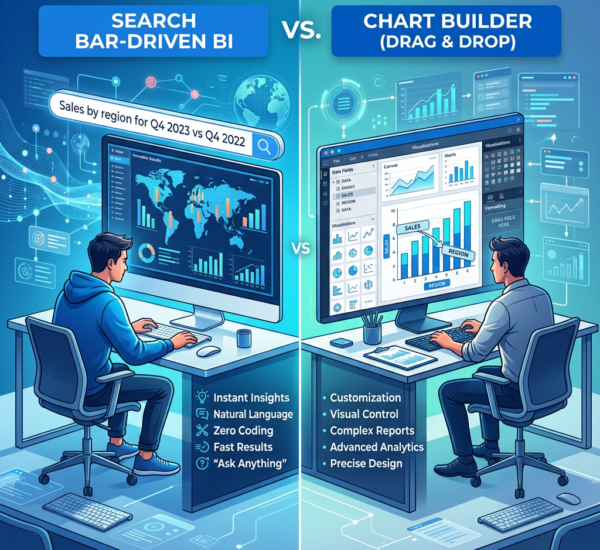
What it is: AI-powered analytics where you ask questions in plain English and get visualizations + analysis automatically.
Why it works for small business:
You don’t build dashboards — you ask questions. “What were my top 3 revenue sources last month?” generates the answer. “Why did expenses increase this quarter?” analyzes the data and explains what changed.
Key strengths:
– Zero learning curve — if you can type a sentence, you can use it
– Connects to 50+ tools (QuickBooks, Stripe, Shopify, Google Analytics, HubSpot, Salesforce, databases, spreadsheets)
– AI doesn’t just visualize — it analyzes and explains what’s happening
– Dashboards generate automatically from conversations
– No formulas, no SQL, no configuration
Pricing: Starts free. Paid plans for additional data sources and team features.
Best for: Any small business owner who wants answers without learning a BI tool. E-commerce, SaaS, services, retail — if you have data in common tools, Pulse AI connects and analyzes it.
Setup time: Under 10 minutes (connect data sources, start asking questions).
2. Zoho Analytics — Best for Zoho Users
What it is: BI tool within the Zoho ecosystem with drag-and-drop dashboard building and Zia AI assistant.
Why it works for small business:
If you already use Zoho CRM, Zoho Books, or other Zoho products, the data integration is seamless. Zia lets you ask basic questions in natural language.
Key strengths:
– Tight integration with Zoho suite
– Affordable ($24/month for 2 users)
– Pre-built dashboard templates
– Zia AI for simple natural language queries
– White-label options for client reporting
Pricing: $24/month (2 users), scales up with users and data volume.
Best for: Small businesses already on Zoho. If you’re not using Zoho products, other tools are better.
Setup time: 1-2 hours (connect Zoho accounts, customize templates).
3. Google Looker Studio — Best Free Option for Google Data
What it is: Free dashboard tool from Google. Best for businesses whose data lives primarily in Google Analytics, Google Ads, and Google Sheets.
Why it works for small business:
It’s completely free for Google data, and sharing is simple (Google Drive-style permissions). If your business runs on Google products, Looker Studio gives you decent dashboards at zero cost.
Key strengths:
– Free (no per-user fees)
– Native Google ecosystem integration
– Community templates for common reports
– No software to install (web-based)
Pricing: Free for Google data. $40-200/month for non-Google connectors (Supermetrics, etc.).
Best for: Marketing-focused small businesses that use Google Analytics and Google Ads.
Setup time: 1-3 hours (connect sources, build/customize dashboards).
Limitations: Limited to Google data without paid add-ons. No AI analysis. Basic chart types. Slow with large datasets.
4. Grow — Best for Pre-Built Small Business Dashboards
What it is: BI tool designed specifically for SMBs with hundreds of pre-built dashboard templates.
Why it works for small business:
Instead of building dashboards from scratch, you pick a template (“E-commerce Overview,” “SaaS Metrics,” “Agency Performance”) and connect your data. The dashboard is pre-built.
Key strengths:
– Pre-built dashboards for common business types
– 150+ data source connectors
– Simple setup process
– Good support for non-technical users
– TV dashboard mode for office displays
Pricing: Starts at $99/month (5 users included).
Best for: Small businesses that want a working dashboard quickly and don’t want to build from scratch.
Setup time: 30 minutes to 2 hours (connect data, pick template, customize).
Limitations: Less flexible than Tableau/Power BI if you need highly custom analysis. Pricing scales up quickly with more users.
5. Databox — Best for KPI Tracking and Alerts
What it is: Dashboard and KPI monitoring tool with a focus on real-time metrics and mobile access.
Why it works for small business:
Pre-built integrations for 70+ tools. Mobile app lets you check KPIs from anywhere. Goal tracking and automated alerts when metrics hit thresholds.
Key strengths:
– Mobile-first design (great app)
– Pre-built KPI templates
– Automated alerts (email/Slack when metrics change)
– Free tier available (3 data sources)
– Goal tracking built in
Pricing: Free (limited), Starter at $47/month, Pro at $135/month.
Best for: Small business owners who want to monitor key metrics daily and get alerted to changes — not deep analysis.
Setup time: 30 minutes to 1 hour.
Limitations: Better for monitoring than analysis. Limited custom calculation capabilities.
6. Klipfolio — Best for Real-Time Dashboards
What it is: Dashboard platform designed for monitoring KPIs in real-time with 100+ pre-built connectors.
Why it works for small business:
Connect your tools, pick from dashboard templates, customize to your KPIs. TV dashboard mode for office displays. Real-time data refresh.
Key strengths:
– Real-time data updates
– Pre-built dashboards for common use cases
– 100+ integrations
– Office TV display mode
Pricing: $125/month (Grow plan, up to 5 users).
Best for: Teams that want to display KPIs on screens in the office and need real-time monitoring.
Setup time: 1-2 hours.
Limitations: Not ideal for ad-hoc analysis or answering new questions — better for monitoring established KPIs.
Comparison Table
| Tool | Monthly Cost | Learning Curve | AI Built-in | Best For |
|---|---|---|---|---|
| Pulse AI | Starts free | None — plain English | Yes (core) | Anyone wanting fast answers |
| Zoho Analytics | $24 | Low-moderate | Basic (Zia) | Zoho ecosystem users |
| Looker Studio | Free | Low-moderate | No | Google marketing data |
| Grow | $99 | Low | No | Template-driven dashboards |
| Databox | $47 | Low | No | Mobile KPI monitoring |
| Klipfolio | $125 | Low-moderate | No | Real-time office displays |
Tools to Avoid (For Small Business)
Tableau — $75/user/month. Requires analyst skills. Steep learning curve. Built for enterprises.
Power BI — Requires DAX formula language for custom metrics. Better for Microsoft-heavy organizations with technical users.
Looker (original) — Enterprise pricing ($20K+/year). Requires data warehouse and technical setup.
Metabase — Great tool, but requires self-hosting and someone technical to maintain the server.
Domo — Enterprise pricing. Overkill for small business needs.
These tools are powerful but built for organizations with data teams. As a small business owner, you’ll spend more time learning the tool than getting insights.
How to Choose
“I just want to ask questions about my data without learning a tool” → Pulse AI. Natural language interface, no setup complexity.
“I’m already using Zoho products” → Zoho Analytics. Natural fit with your existing tools.
“My business runs on Google (Analytics, Ads, Sheets)” → Looker Studio. Free and directly connected.
“I want a pre-built dashboard for my industry” → Grow. Pick your template, connect data, done.
“I want to check KPIs from my phone” → Databox. Best mobile app.
“I want dashboards on TVs in the office” → Klipfolio. Purpose-built for display.
FAQ
How much should a small business spend on BI tools?
For businesses under $1M revenue: $0-100/month is realistic. $1-5M revenue: $100-500/month. Over $5M: $500-2,000/month depending on team size and data complexity. Avoid enterprise tools with $5K+/month minimums unless you’re at $10M+ revenue.
Do I need a data analyst to use these tools?
For the tools listed here — no. Pulse AI, Zoho Analytics, Looker Studio, Grow, Databox, and Klipfolio are all designed for non-technical business users. If a tool requires an analyst to set up or use, it’s not on this list.
Can I combine data from multiple sources?
Yes, but capability varies. Pulse AI and Grow handle multi-source analysis natively. Looker Studio requires “data blending” (limited). Databox and Klipfolio display multi-source KPIs but don’t do cross-source calculations well. Zoho Analytics works best within the Zoho ecosystem.
What’s the easiest tool to set up?
Pulse AI (connect sources, start asking questions — under 10 minutes). Databox and Grow are also quick (template-driven). Looker Studio and Zoho Analytics take 1-3 hours to get a working dashboard.
Is there a truly free BI tool for small business?
Looker Studio is free for Google data. Metabase is free if you self-host (requires technical setup). Pulse AI has a free tier. Databox has a limited free plan. Most others have free trials but require paid plans for real use.
More guides: Best Tableau Alternatives, Power BI Alternatives Without DAX, How to Create Charts From Google Sheets, or try Pulse AI free.